
Client lifecycle (offline activation, self-service)
This document covers only the client-side lifecycle: installing the binary, self-service machine declaration, quotas, runtime verification, and switching between multiple licenses.
Important reminder: the SCA binary NEVER makes an HTTP call. All server ↔ client communication goes through email + user actions on the web portal (
www.codefixture.com).
Chronological summary (3 phases, in order)
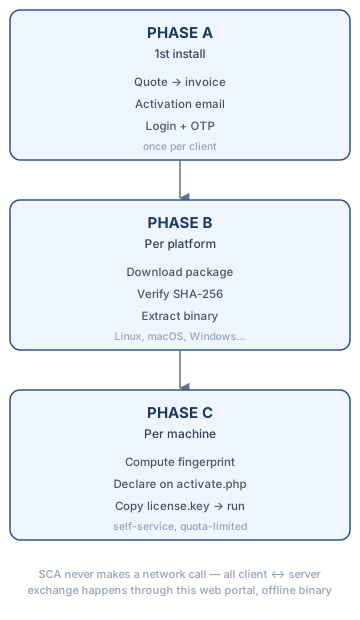
Phase A — First install (once per client)
- Quote, then invoicing — pricing is shared on request (
how-we-price.php); there is no online self-checkout. - Activation email sent as soon as the client account is created, to set a portal password (signed link, valid 2 hours). A second "package ready" email follows once the operator has delivered a binary.
- Login on
www.codefixture.com/login.php: email + password, then a 6-digit login code sent by email and entered onotp.php(two-factor authentication on every login).
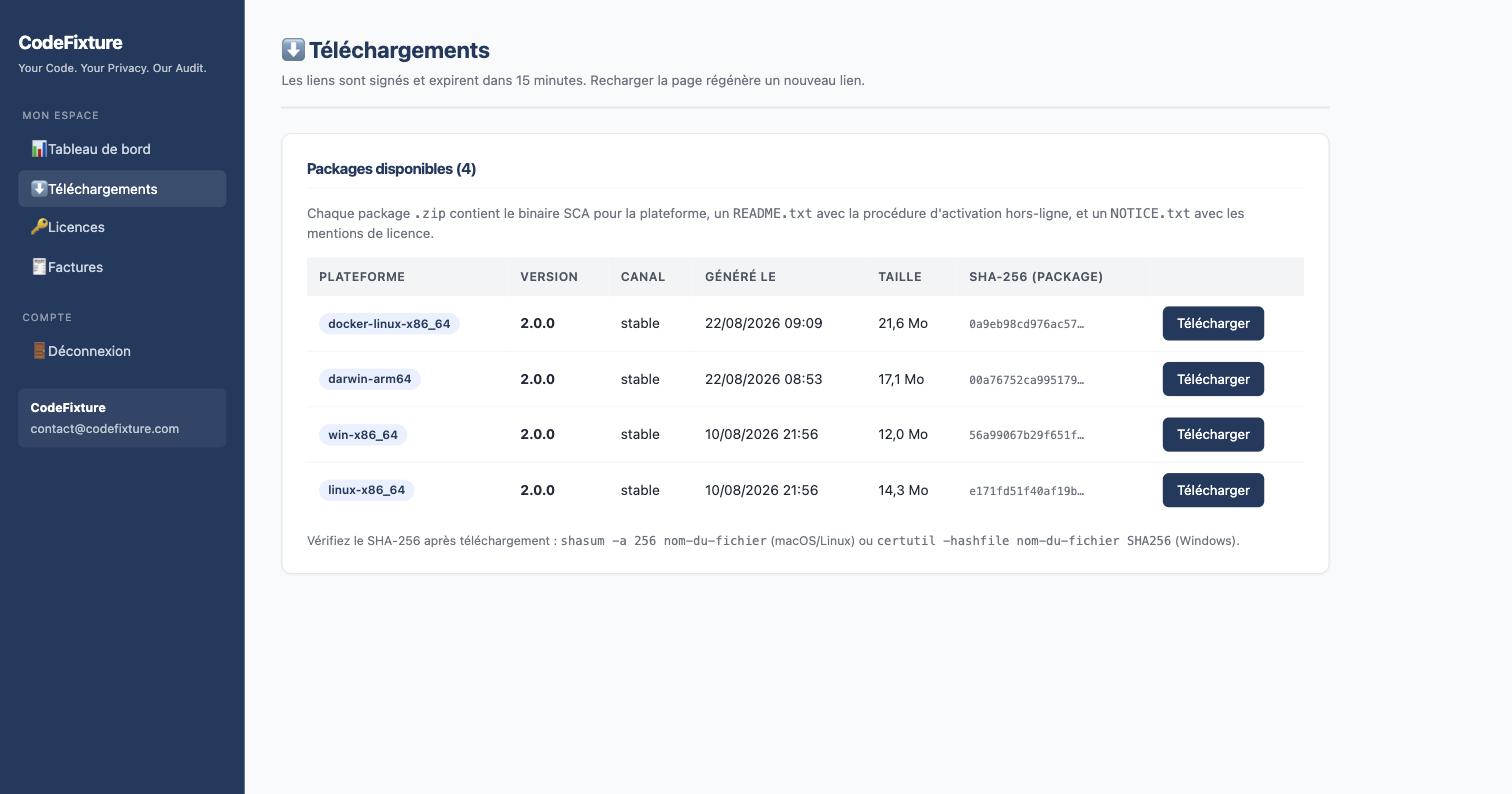
Phase B — For EACH platform used (Linux, macOS, Windows…)
- On
/downloads.php, click Download on the row for the platform you need. You receive a file:sca-<version>-<platform>-<id>.tar.gz(Linux)sca-<version>-<platform>-<id>.dmg(macOS)sca-<version>-<platform>-<id>.zip(Windows)
- Verify the SHA-256 (recommended):
→ compare with the value shown on
shasum -a 256 sca-1.0.0-linux-x86_64-acme.tar.gz # macOS / Linux certutil -hashfile sca-1.0.0-win-x86_64-acme.zip SHA256 # Windows/downloads.php. - Extract the package. Contents:
staticcodeaudit-<platform>(the executable binary)README.txt(offline activation procedure)NOTICE.txt(license notices + offline principle reminder)
Phase C — For EACH machine to activate (up to max_machines, self-service)
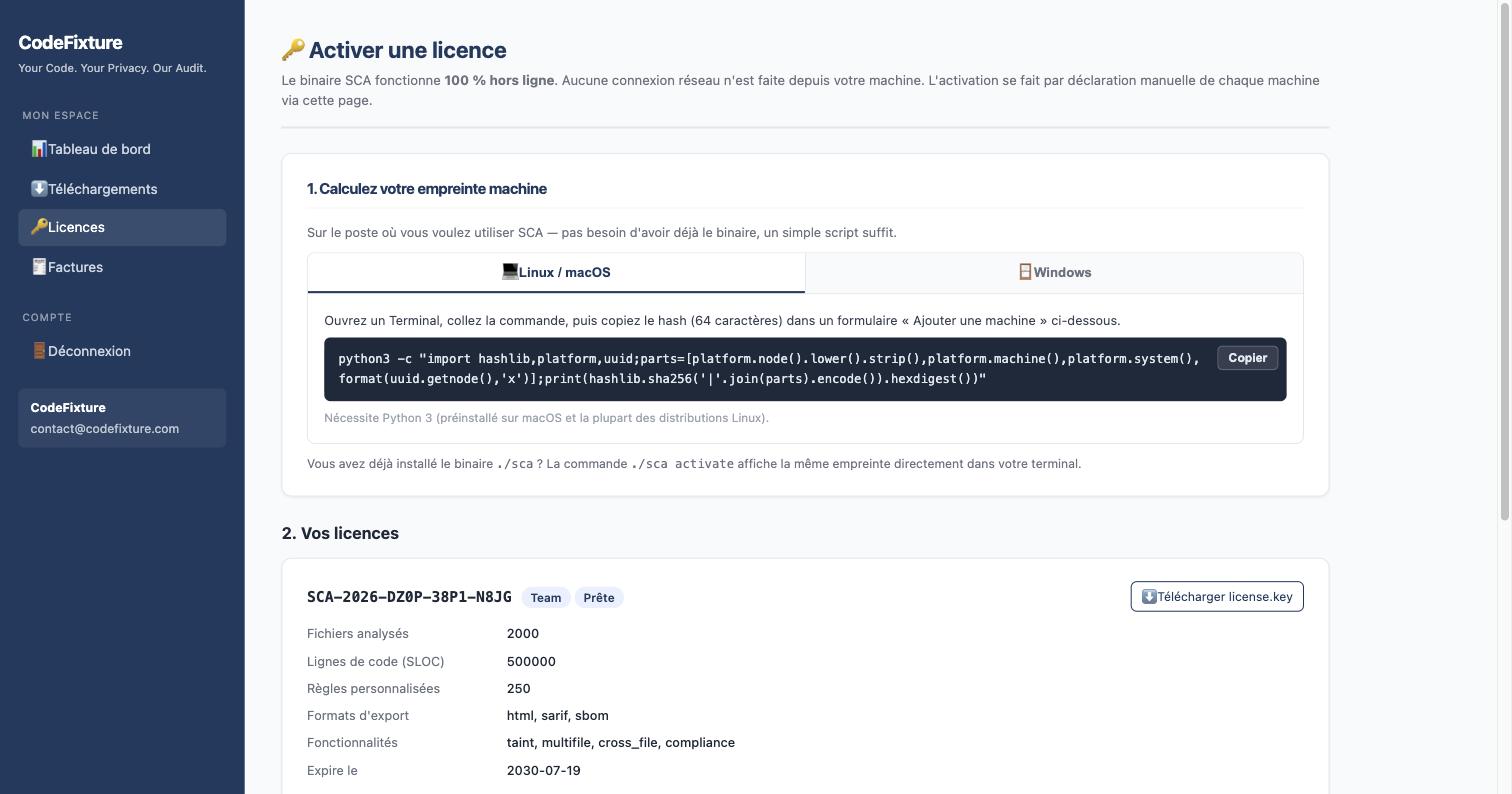
- Compute the machine fingerprint (SHA-256, 64 hex chars, derived from hostname + arch + OS + MAC, no network call) — two equivalent ways:
- Without the binary installed: on
www.codefixture.com/activate.php, a Linux/macOS tab and a Windows tab each provide a one-liner (Python 3 or PowerShell) to paste into a terminal, with a copy button. - Binary already installed:
./staticcodeaudit-<platform> activateprints the same fingerprint directly in the terminal (or the SCA footer during a scan on a not-yet-activated machine).
- Without the binary installed: on
- Copy this fingerprint (USB key, phone, copy-paste) to a machine connected to the Internet — can be the same machine used to compute it.
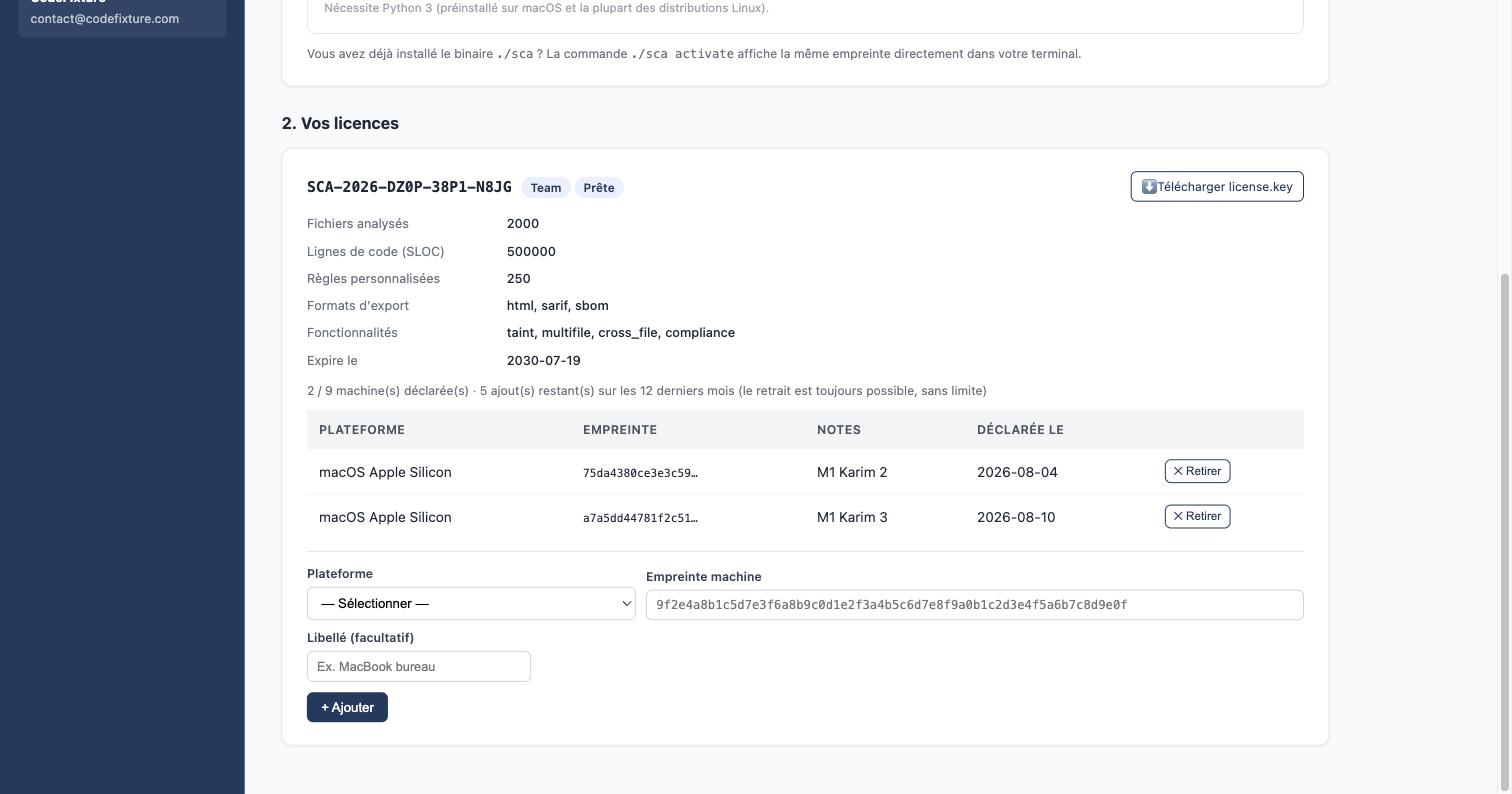
- On that connected machine, go to
www.codefixture.com/activate.php(login required). All of the client's licenses are listed automatically — no serial number to re-enter. For the relevant license:- Select the platform (dropdown)
- Paste the machine fingerprint
- Enter an optional label (e.g. "Office MacBook")
- Click + Add
- The site updates
license.keyimmediately server-side (new fingerprint added to the signed list). Download it via the dedicated button on the license card — available at any time, not just right after adding. - Move the
license.keyto the target machine (USB key / scp / AirDrop) and place it in the same folder as the binary. - Re-run SCA:
→ SCA:
./staticcodeaudit-linux-x86_64 scan ~/my-project- reads the local
license.key - verifies the HMAC HKDF signature (public key embedded — zero network call)
- checks its local fingerprint ∈ signed list
- checks
expires_at > today - runs the scan
- footer at the end:
Status: OK (machine activated)
- reads the local
Self-service quotas (2 distinct dimensions)
Each license has two independent quotas, configurable per pricing tier:
| Quota | What it limits | Reset |
|---|---|---|
Slots (max_machines) |
Number of machines simultaneously declared on the license | Never — a removal frees a slot immediately |
Add frequency (max_machine_changes_per_year) |
Number of machine additions over a rolling 365-day window | Rolling — an addition older than a year automatically drops out of the count |
Shown on /activate.php, per license: "X / Y machine(s) declared · Z addition(s) left over the last 12 months".
Only additions consume the frequency quota — a removal ("✕ Remove" button) is always possible, with no limit: it frees a slot without ever adding extra hardware, so there's nothing to limit on that side. A removal immediately triggers a license.key re-signature (fingerprint dropped from the list): the binary will stop on that machine at its next check (not an instant kill switch — no network call is possible to trigger it sooner).
Renaming a machine's label (notes) is never treated as a change — always possible, even with the addition quota exhausted.
Possible error messages (self-service)
| Situation | Message shown |
|---|---|
| This fingerprint is already declared on this license | This machine is already declared for this license. |
Slot quota (max_machines) reached |
Machine quota reached for this license. |
| Addition quota (365-day window) reached | Machine addition quota reached for the last 12 months. |
| License not active (suspended, expired, revoked) | This license is not active: machine declaration is not possible. |
1 Runtime verification (no Internet)
On every run on an already-activated machine, SCA:
- Reads the local license.key from disk
- Verifies the HMAC HKDF signature (integrity + tamper-proofing — public key embedded in the binary)
- Checks that its local fingerprint ∈ the payload's fingerprints
- Checks expires_at > today
- No network call, no ping, no telemetry.
Consequence: a machine removal or an admin-side revocation only takes effect at the affected binary's next check (re-downloading license.key propagates a removal immediately; for a full license revocation, the user will need to re-download a new license.key that no longer includes their fingerprint, or has a nearer expires_at).
2 Multiple licenses on one machine — SCA_LICENSE_PATH
If a client has 2 different licenses (e.g. personal Solo Plus + team Team — a rare case), they can switch between them without moving any file:
SCA_LICENSE_PATH=~/licenses/team.key       ./sca scan ~/work-project
SCA_LICENSE_PATH=~/licenses/solo-plus.key  ./sca scan ~/personal-project
SCA's lookup order for its license.key:
$SCA_LICENSE_KEY(raw JSON content, set by a wrapper)$SCA_LICENSE_PATH(path to a .key file — recommended for multi-license switching)./license.key(cwd, default convention)
3 Special cases on the client side
| Case | Procedure |
|---|---|
| Add an Nth machine | Redo phase C (steps 7→12) on the new machine. Consumes 1 addition of the frequency quota (subject to max_machines slots being available). |
| OS reinstall on the same machine | The fingerprint changes → redo phase C (new addition). If the slot quota is reached, remove the old fingerprint first from /activate.php (free, no limit). |
| Machine-to-machine transfer | Remove the old one from /activate.php → redo phase C on the new one (1 addition consumed). |
| Lost/stolen machine | Remove from /activate.php — takes effect at that binary's next check. |
Lost license.key file |
Re-download it at any time from /activate.php (dedicated button per license) — no need to redo phase C, the fingerprint is already declared. |
| Annual renewal | The client redoes step 4 (download new package) + step 11 (move new license.key) on each machine if the version changed. |