
Watch It On A Real Project
We ran StaticCodeAudit on JeecgBoot, a popular open-source Java/Vue low-code platform (Apache 2.0, 1,369 files) — once in demo mode, once with a full license. Same engine, same rules, same report format. Here is what changed.
Scanned 2026-08-04 — a fixed snapshot, not a live scan.
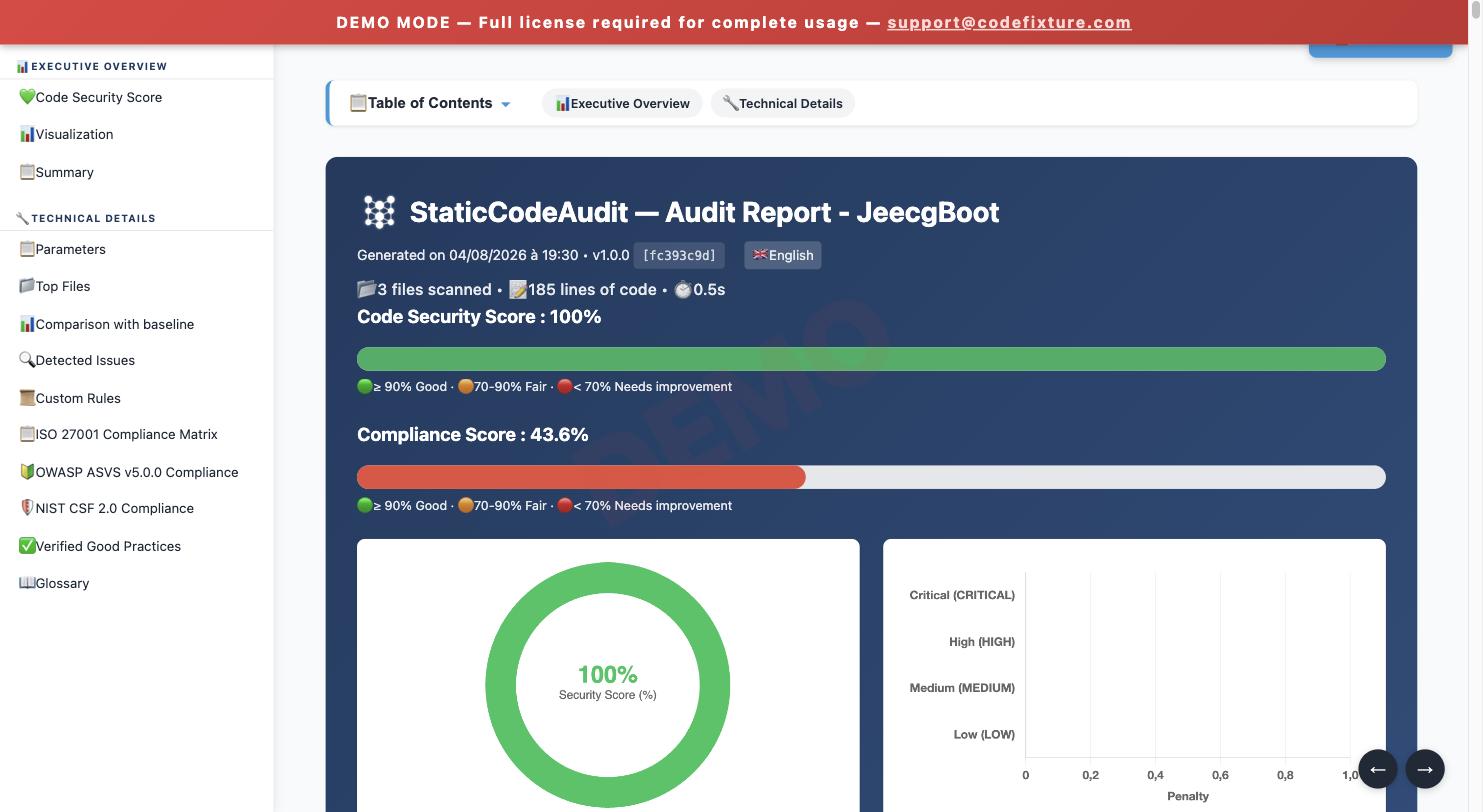
- Files scanned
- 3
- Findings
- 0
Nothing wrong in this 3-file sample — the demo simply hasn't seen the other 1,366 files yet.
View the full report →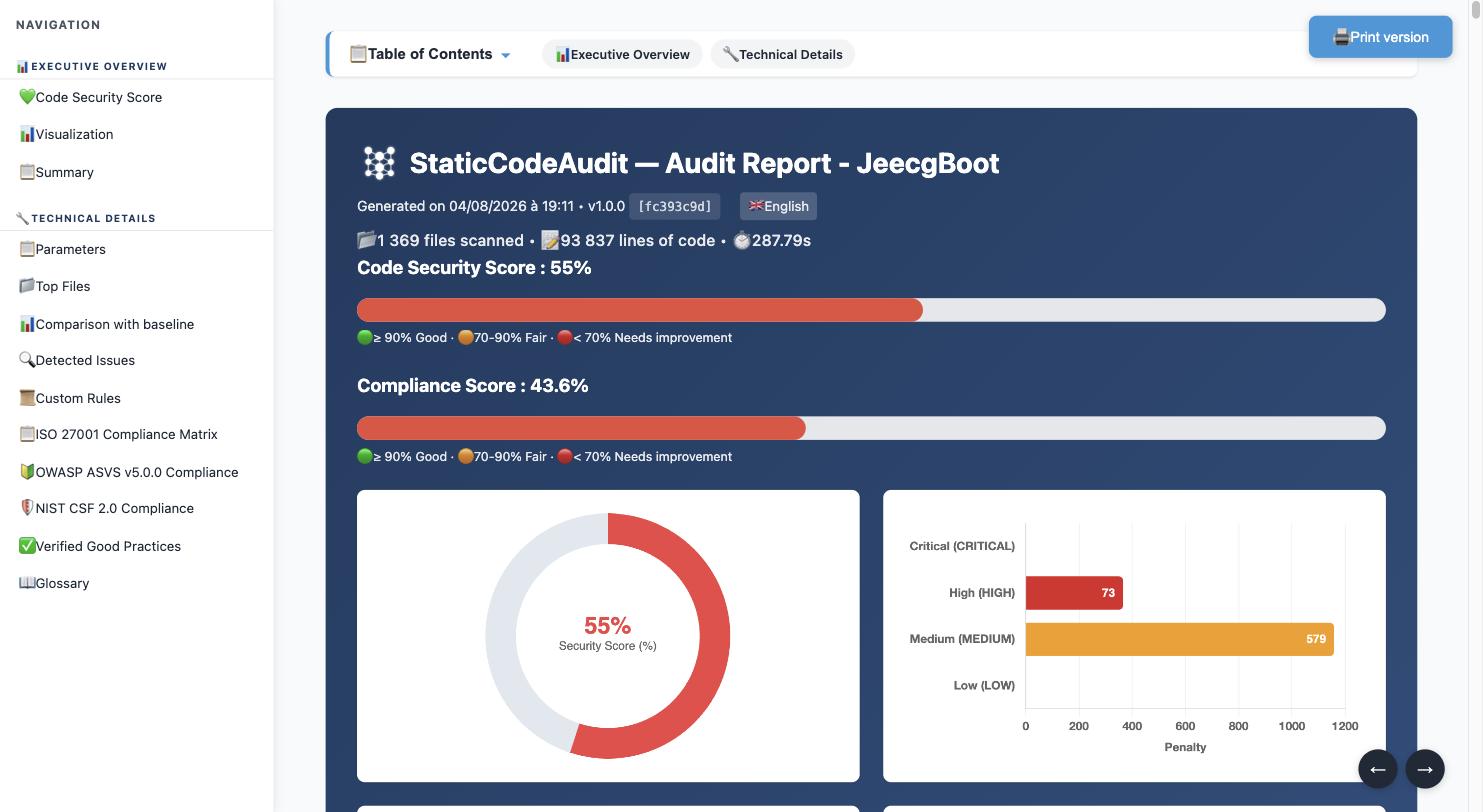
Why the difference? Not what you think.
- Same engine — the demo runs the exact same rule engine as a paid license, not a stripped-down version.
- Same features — taint analysis, cross-file tracking, and compliance mapping (ISO 27001, ASVS) are active in demo mode too.
- Only the scope changes — the demo tier caps every scan at 3 files and 100 lines of code. Paid tiers lift that cap.
Zero findings on 3 files doesn't mean your code has zero problems — it means those 3 files were clean. The demo lets you see exactly how StaticCodeAudit reports on your own code, risk-free, before scanning everything.
Download the Demo
Linux x86_64 (Docker)
Format :
.tar.gz
- Size
- 19,6 Mo
- SHA-256
- b1967344775afcc820aac1ed48c1e50bbe460e7f970336384d972a7e68fc1409
- Built
- 2026-08-12 08:32
Docker: extract the .tar.gz, then run docker compose build followed by docker compose run --rm sca /opt/sca/staticcodeaudit-docker-linux-x86_64 /data — see the included README.md for full instructions.
macOS (Apple Silicon)
Format :
.dmg
- Size
- 15,2 Mo
- SHA-256
- 88e2e514a951688beac6e9eeaf946ee2db10f63d15dc5de337911eee372e894f
- Built
- 2026-08-10 22:07
macOS: open the .dmg, drag to Applications, then run ./setup.sh from the mounted volume (clears Gatekeeper quarantine), then ./staticcodeaudit-darwin-arm64 /path/to/project.
Linux x86_64
Format :
.tar.gz
- Size
- 14,4 Mo
- SHA-256
- 448a423b339ede778cbbd21716cd068d877c910b26fb1c6a26d0dbcb3afc3749
- Built
- 2026-08-10 22:15
Linux: extract the .tar.gz, then run ./staticcodeaudit-linux-x64 /path/to/project in a terminal.
Windows x86_64
Format :
.zip
- Size
- 11,6 Mo
- SHA-256
- b958c2b52dfd83efece07609f08b6be83c40d05a981684b30abd514e6091347c
- Built
- 2026-08-10 22:35
Windows: extract the .zip, then run staticcodeaudit-windows-x64.exe C:\path\to\project in a terminal.
Watch It Run
The real launch command for each platform, and what StaticCodeAudit actually prints while it scans.
Report Features
Self-contained HTML report with 26+ interactive charts, no server required.
26+ Interactive Charts
Severity distribution, category breakdown, timing analysis, historical trends.
Health Score
Logarithmic security score normalized by LOC with severity penalties and color-coded progress bar.
Baseline Comparison
Track new, resolved and persistent issues across up to 10 audit snapshots.
SARIF 2.1.0 Export
GitHub Code Scanning and GitLab SAST compatible. Drop into your CI/CD pipeline.
SBOM Generation
CycloneDX 1.5 Software Bill of Materials. Know every component in your project.
Git Blame Integration
Automatically resolve the committer per finding for team accountability.
⚠️ Demo limitations
- Max 3 files per scan
- Max 100 lines of code per scan
- Max 1 custom rule
- "DEMO" watermark on every report
- License valid 1 year — re-download anytime
How activation will work
The binary is 100% offline — the demo already shows you exactly how it'll work once you're subscribed.
- Run the binary once: it automatically prints your machine fingerprint, no special command needed.
- Once subscribed, enter that fingerprint with your serial number on activate.php.
- Download the returned license.key file and place it next to the binary. Done.
StaticCodeAudit — activation requise

Aucune license.key trouvée (mode démo activé).

Pour activer cette machine, communiquez l'empreinte ci-dessous
sur https://www.codefixture.com/activate.php :

Empreinte machine :
    9f2e4a8b1c5d7e3f6a8b9c0d1e2f3a4b5c6d7e8f9a0b1c2d3e4f5a6b7c8d9e0f
Exact terminal output from the demo binary (currently shown in French, matching the real CLI).
🔒 The binary never contacts our servers: your source code never leaves your machine, even during activation.
The demo license is bundled inside the binary — no license.key file to manage. To upgrade later, place a paid license.key next to the binary.
Need more capacity?
Solo, Team, Enterprise plans remove all demo limits. Annual subscription, no seat fee, no installation cost.
View pricing